
Create Makerspace
Create Makerspace is an accessible and inclusive workshop in Squamish, BC offering memberships, classes and design & fabrication.
Date de début : mardi, 17 novembre 2026.
Horaire :
Les mardis, 18 h 00 - 21 h 00 ,
5 fois à partir du 17 novembre 2026 ,
Digital Fab Lab ,
Lieu : Digital Fab Lab (Create Makerspace) | #1-39449 Queens Way, Squamish, BC, V8B0R5
Description :
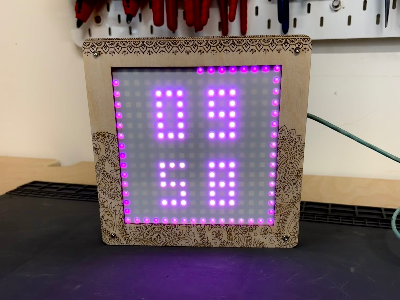
Get an introduction to Digital Fabrication while building your own personal display! This five-week course is designed as an overview to the various areas of Digital Fabrication: Laser Cutting, 3D Printing, Electronics, and Coding. Each session covers a new area, and builds upon the knowledge you gain to create a finished product. Successfully completing this course enables you to use all the areas of the Digital Fab Lab. What You'll Make A Personalized Digital Dashboard - customize your LED display to show the time, weather, countdowns, lamp modes, and more! Switch through your displays at the touch of a button. A plywood-framed LED display with a 3D printed housing, driven by an ESP32 microcontroller. The project introduces laser cutting, circuit building, microcontroller programming, and CAD modelling in sequence, with each week's work feeding into the next. All materials are included in the course registration cost, and students take the finished dashboard home. What You'll Learn Weekly Structure (At a Glance) Certification & Shop Access Upon successful completion, participants are certified for independent use of the Create Makerspace laser cutters and 3D printers, within the scope of the tools covered in this course, and will have completed an electronics safety orientation. Note that this class does not cover the soldering iron, and separate certification is required for this tool. Who This Class Is For No previous experience required. We recommend basic computer skills: opening and saving files, and using a mouse.
Places disponibles : 5
Prix : 390,00 $ Taxes en sus
Âge requis : Plus de 16 ans au jour de l'activité
Prérequis : None
Partagez cette activité :